FPV Stream App
Live streaming HD and analog FPV footage.
FPV Stream: A Two-Device iOS Live Streaming Workflow
A custom iPhone and iPad streaming system for broadcasting FPV flights to Twitch with overlays, chat, and camera controls.
At a Glance
- Project type: Personal tooling project
- Core tools: iPhone, iPad, HDZero goggles, RTMP, Twitch, iOS, and iPadOS
- Status: In active use and development
Links
The Catalyst
About two months ago, I bought my first Tiny Whoop FPV drone: the BetaFPV AIR65.
I quickly started flying every day and wanted to do something with the footage I was recording while practicing. I began posting the videos on YouTube, but I realized that I enjoyed flying much more than editing.
That led me to consider live streaming. I wanted a convenient mobile workflow that would let me broadcast my FPV flights directly from my iPhone.
My hypothesis was:
Could I build a reliable mobile streaming system that combines an FPV video feed, overlays, chat, and a forward-facing camera in a single live broadcast?
The Solution
I first tried using existing iOS and iPadOS streaming applications, but the available workflows had limitations. I eventually built my own application that splits the streaming responsibilities between an iPad and an iPhone.
The custom system is designed to:
- Stream to Twitch through RTMP
- Support a target output of at least 1080p at 30 frames per second
- Combine FPV footage, stream elements, and a forward-facing camera
- Customize scenes, overlays, and the chat view
- Add microphone synchronization delay
- Record the final stream canvas locally while broadcasting
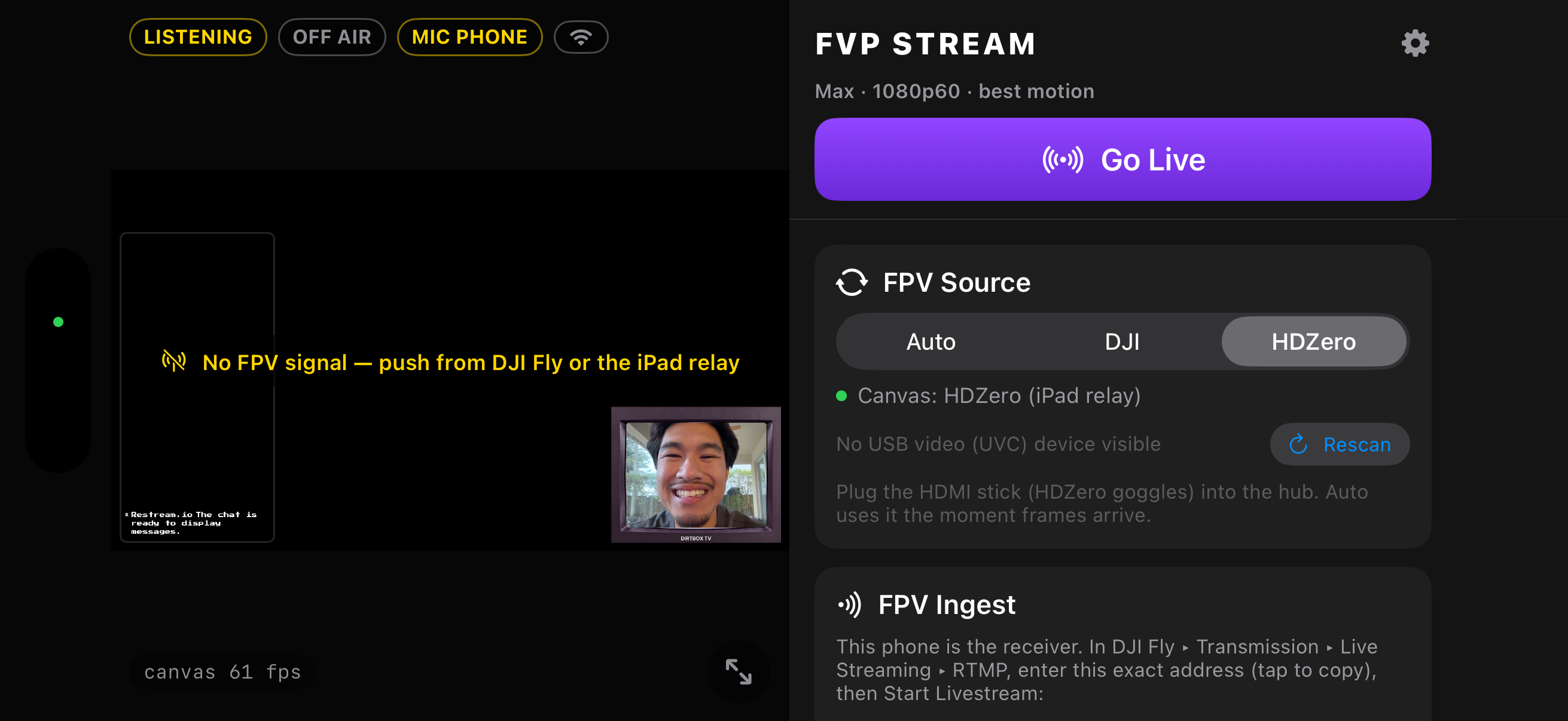
The main iOS application provides the streaming canvas that I use on my iPhone. From this screen, I can choose the video source, customize the scene, add overlays, adjust the chat view, add microphone delay, and record the canvas locally.
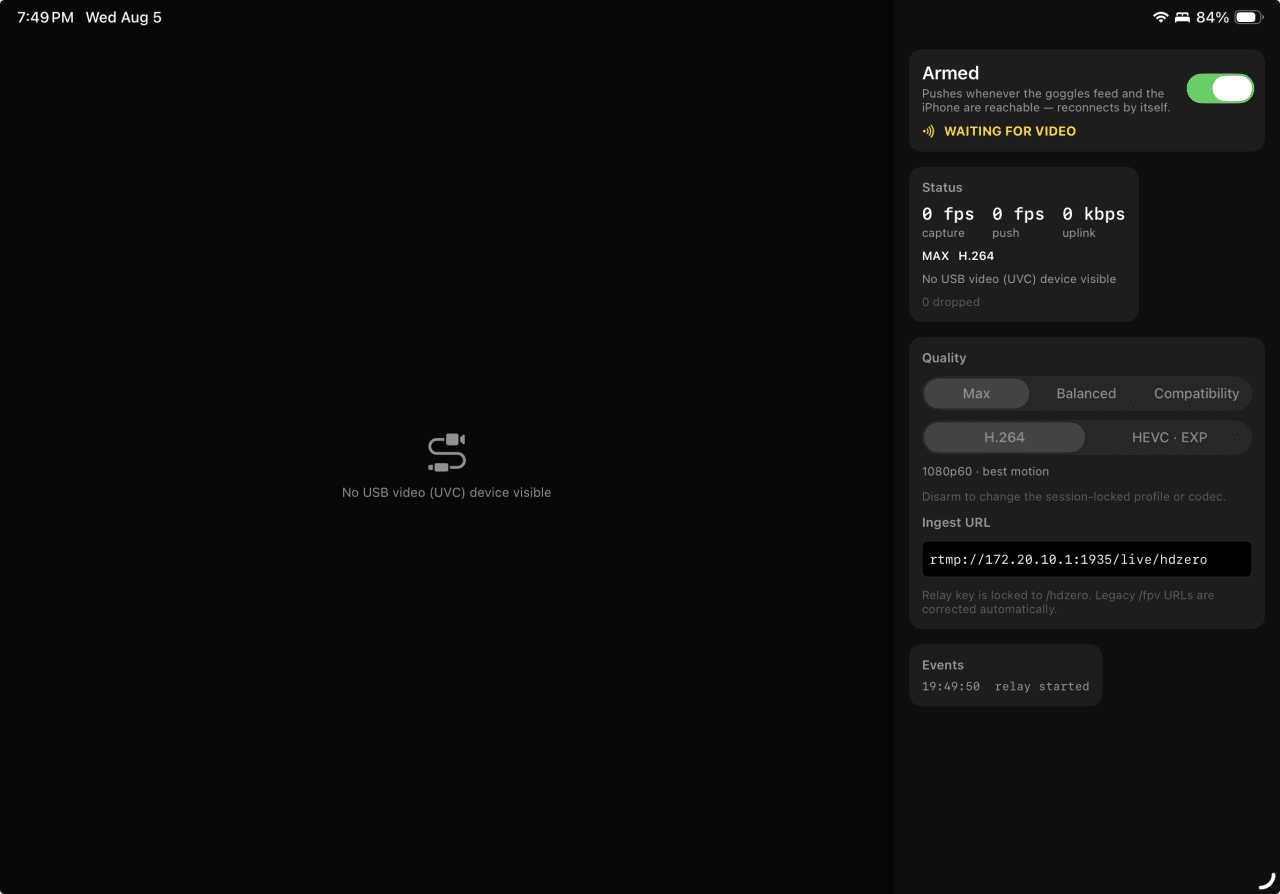
The companion iPad application is focused on ingesting the FPV video feed from my HDZero goggles and transmitting it to the iPhone. Its minimal design keeps the application focused on video capture and relay.
Architecture and Technical Decisions
The first version of the workflow attempted to run everything from the iPhone. I connected my HDZero goggles to an HDMI-to-USB-C capture device and tried to use an existing streaming application from the App Store.
The iPhone did not recognize the capture device. I discovered that the iPhone did not support the UVC capture workflow I needed, so I moved the video-ingestion process to an iPad.
The final architecture splits the workload between the two devices:
- The iPad receives the FPV video feed through the capture device.
- The iPad transmits that feed to the iPhone through a personal hotspot.
- The iPhone combines the FPV footage with the stream canvas, overlays, chat, and forward-facing camera.
- The iPhone broadcasts the completed stream to Twitch through RTMP.
Splitting the workflow allowed each device to focus on a smaller set of responsibilities. The iPad handles video ingestion, while the iPhone handles scene composition and broadcasting.
The iPad application is also loosely coupled to the rest of the system. Since its purpose is to ingest and transmit video, it could eventually be replaced by another RTMP transmitter device.
Challenges and Pivots
The first major challenge was hardware compatibility. Existing iOS streaming applications could not recognize the capture device connected to my iPhone, which forced me to investigate a second-device workflow.
The second challenge appeared when I tested existing iPad streaming applications. Although they could work with the capture device, Twitch returned an error whenever I added a stream element or overlay.
These issues convinced me that building a custom application would be more useful than continuing to work around the limitations of existing streaming tools.
Current Status and Impact
The application is currently being used for my livestreams on Twitch.
It has been reliable on both Wi-Fi and 5G networks and works with DJI and analog video systems. The current implementation supports the core workflow of receiving an FPV feed, composing the stream canvas, and broadcasting to Twitch.
The application is still in development, but it has already become a practical tool for streaming my flights.
Roadmap and Lessons Learned
Planned improvements include:
- Conducting more field tests and polishing the streaming workflow
- Supporting additional live-streaming platforms beyond Twitch
- Improving compatibility with different FPV video systems
- Releasing the application on the App Store for other FPV pilots
This project taught me that mobile streaming is not just a software problem. Hardware compatibility, video transport, processing requirements, and broadcast reliability all need to be considered together.
I also learned that splitting a complex workflow across multiple devices can be a practical solution when one device cannot reliably handle video ingestion, composition, and broadcasting at the same time.